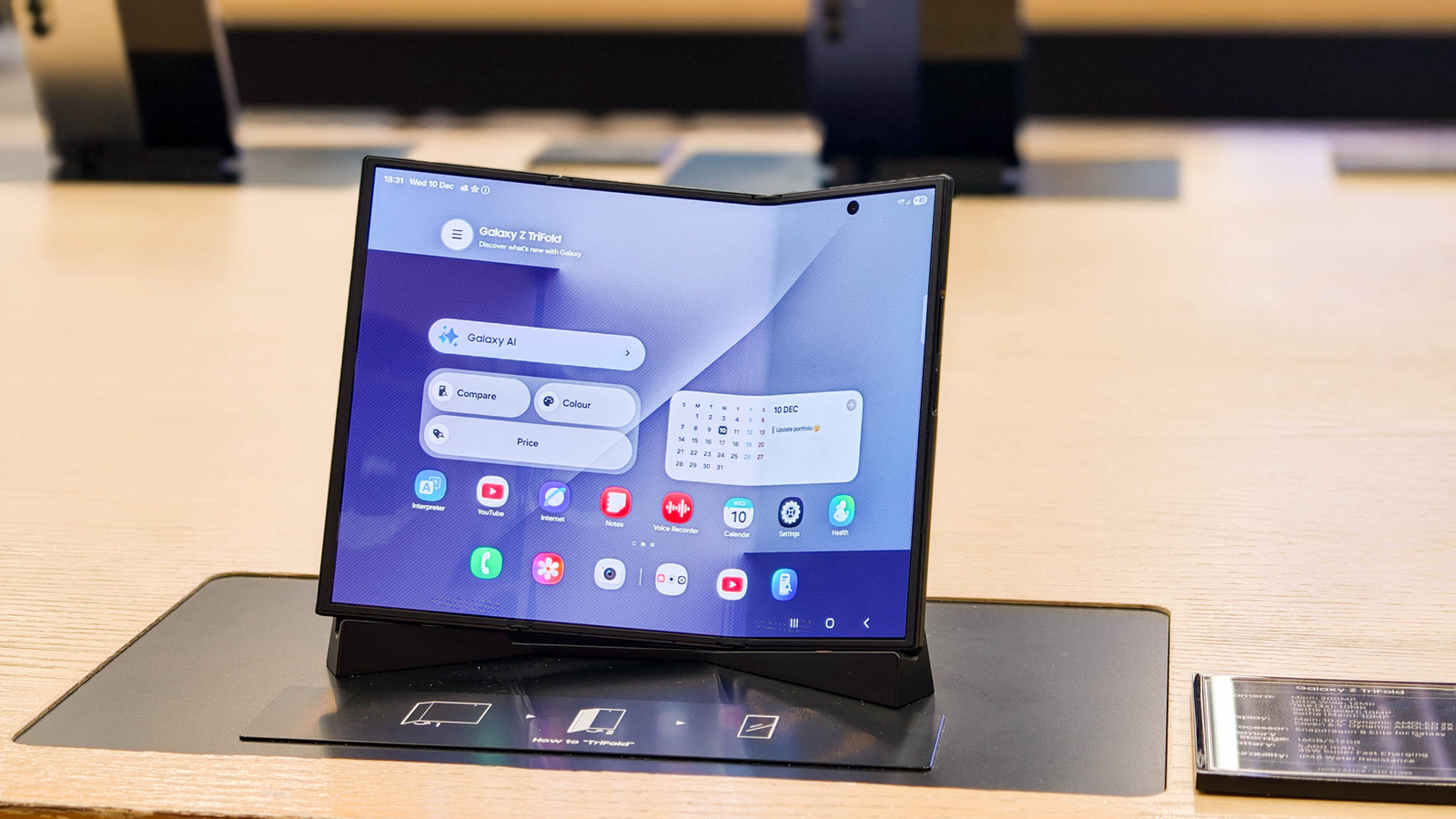
Samsung’s latest innovation, the TriFold, represents one of the most ambitious experiments in mobile computing to date. With a price tag of $2,899, this hybrid device aims to blend the functionality of a smartphone, tablet, and laptop into a single piece of hardware. It isn’t just another foldable phone — it’s Samsung taking a bold step into the future of portable computing. But does it deliver on that promise, or is it an exercise in engineering excess?
After weeks of use across real-world scenarios — from daily productivity tasks to creative workflows — the TriFold proves fascinating and capable, yet imperfect. It embodies both the promise of a multi-form factor device and the challenges that come with redefining categories. Here’s what it’s really like living with Samsung’s TriFold.
A First Look: Design That Demands Attention
Out of the box, the TriFold immediately signals that it’s unlike any other device. At first glance, it resembles a larger smartphone with an elongated display. But unfold it once, and you’re greeted with a tablet-like screen. Unfold it further, and suddenly you’re working with a widescreen display that rivals many laptops.
This three-panel design — thin, nearly bezel-free OLED screens that fold like an accordion — is astonishing from a technical standpoint. Samsung has engineered precision-hinges that feel secure and well-balanced, although the mechanism is noticeably heavier than traditional clamshell foldables. At around three pounds fully unfolded, it isn’t something you’ll want to hold up for long reading sessions. But that weight does contribute to a sturdier feel when placed on a desk.
Samsung has also included a detachable keyboard that connects magnetically and can be positioned at different angles. While this accessory is optional, it’s almost required if you plan to use the TriFold as a productivity machine.
Performance Across Modes: Phone, Tablet, Laptop
One of the core promises of the TriFold is that it should adapt fluidly to different usage scenarios — and for the most part, it does.
Phone Mode:
Folded into its most compact form, the TriFold works reasonably well as a smartphone. The external screen is bright, sharp, and vivid thanks to Samsung’s top-tier AMOLED technology. Navigation is smooth, and performance feels flagship-level thanks to Samsung’s latest processor and ample RAM. Video calls, browsing, and messaging all feel familiar and effortless.
However, that “phone” form is still wider and heavier than the average smartphone, making one-handed use awkward at best. This isn’t a device you’ll slip into a pocket with ease. It’s closer to a compact tablet with phone capabilities than a true replacement for daily smartphone use.
Tablet Mode:
Unfolded once, the TriFold becomes a spacious tablet. Video streaming, reading, multitasking, and mobile gaming all benefit from the generous screen real estate. Split-screen apps run smoothly, and the vast display makes productivity apps feel less cramped than on traditional foldables.
Artists and note-takers will appreciate the responsive stylus support (sold separately), which performs impressively with low latency and precision. For this reason alone, many creatives may find the TriFold’s tablet mode its most compelling feature.
Laptop Mode:
Fully opened and paired with the keyboard, the TriFold attempts to bridge into laptop territory. Samsung’s software intelligently adapts: taskbars appear, app windows can be resized and snapped, and productivity tools feel largely intuitive.
Typing on the detachable keyboard is comfortable, though key travel and spacing won’t rival premium ultrabooks. Portability, however, is where the TriFold shines — a laptop experience without carrying a separate device.
Still, there are limitations. Some desktop-style software experiences feel truncated compared to full laptops, especially when dealing with advanced creative tools, spreadsheets with complex formulas, or development environments. The TriFold’s emphasis on mobile-optimized apps means it excels in everyday tasks but isn’t a full replacement for professionals who rely on heavy desktop software.
Battery Life and Real-World Use
With great screens come great power demands, and the TriFold’s battery life reflects that. Samsung has equipped the device with a robust battery, and in average use — browsing, streaming, messaging, and light multitasking — it reliably makes it through a day. But when pushed into intensive use in tablet or laptop mode (multitasking, gaming, prolonged video editing), the battery depletes far faster.
Fast charging helps, but the power draw of three OLED panels means you’ll want to keep a charger handy if you plan to use the TriFold heavily away from power outlets.
Software That Adapts — Mostly
Samsung’s One UI has been adapted for the TriFold’s varying display sizes in thoughtful ways. The transitions between folded, half-open, and fully open states are intuitive, and supported apps adjust fluidly.
Multi-window multitasking — laying out three apps side by side — is one of the device’s best features. It turns the TriFold into a genuine productivity machine without requiring a separate monitor.
However, not all apps are optimized. Some third-party applications still behave as though they’re on traditional phones, leading to awkward scaling or wasted screen space. Samsung has made strides in encouraging developers to support its multi-form factor devices, but work remains.
Unique Advantages and Everyday Value
Despite its quirks, the TriFold delivers unique benefits that no other mainstream device currently offers:
- All-in-one versatility: You have one device that handles communication, creativity, media, and productivity.
- Immersive multitasking: Multiple apps side by side make workflows smoother.
- Enhanced creativity tools: Stylus support and a large canvas put creative work front and center.
- Accessory-ready design: The keyboard and optional stylus elevate the device’s utility without clutter.
For travelers, students, and mobile professionals who carry fewer devices by choice, the TriFold could redefine portability.